
Close Menu
    What's Hot

    Cyclops Marvel Rivals Guide: Abilities, Team-Ups & Counters

    June 13, 2026

    How to Create and Customize Roblox Avatar

    June 13, 2026

    How to Play Roblox on PC, Mobile and Console

    June 13, 2026
    Facebook X (Twitter) Instagram
    Game Devourer
    • Home
    • News
    • Guides
    Game Devourer
    You are at:Home - Subnautica - Subnautica 2: Modification Station Blueprint Location
    Subnautica

    Subnautica 2: Modification Station Blueprint Location

    By Sohan DasguptaMay 17, 20263 Mins Read
    Facebook Twitter Pinterest Reddit WhatsApp Copy Link
    Modification Station in Subnautica 2 (Image via Unknown Worlds Entertainment)
    Modification Station in Subnautica 2 (Image via Unknown Worlds Entertainment)

    Summary

    • The Modification Station is used to upgrade vehicles, tools, and equipment.
    • To craft the Modification Station, you will require its Blueprint.
    • You need Titanium, Celestine, and Copper for the crafting process.

    In Subnautica 2, exploration often requires you to travel across long distances and dive into deeper underwater regions. To make navigation easier, the game provides vehicles and modules that improve mobility. However, you can upgrade these further by using the Modification Station.

    In addition to vehicle enhancements, it also allows you to improve tools and equipment. With so much to offer, the Modification Station is one of the most useful additions for your Seabase module. To get the item, you need to find its Blueprint and then scan it for the recipe. Here is a detailed guide to the Modification Station Blueprint in this survival title.

    Read more: Subnautica 2: How To Find and Escape Collector Leviathan

    Location of Modification Station Blueprint in Subnautica 2
    Subnautica 2 Celestine deposits
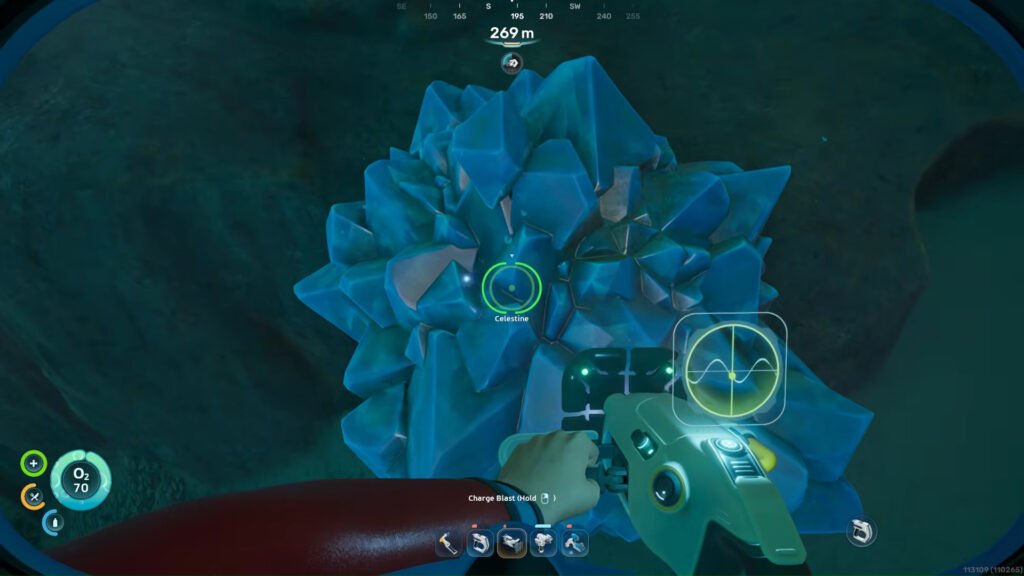
    You will need Celestine to craft the Station (Image via Unknown Worlds Entertainment | | @WoWQuest/YouTube)

    As mentioned earlier, the Modification Station Blueprint is essential to craft the usual appliance. Moreover, finding it can be difficult, considering the large distance from the Lifepod. Follow these steps to reach the blueprint location:

    • Begin travelling east from the Lifepod
    • After covering roughly 1300 meters, you will encounter a massive tower
    • From this landmark, dive down to a depth of around 120 meters to locate an abandoned station
    • Enter the structure through the narrow opening
    • Once inside, turn left and move through the corridor
    • After that, turn right to find the Modification Station Blueprint
    • Scan the Blueprint to unlock it

    Read more: How Many Players Can Play Subnautica 2?

    Using Modification Station Blueprint in Subnautica 2

    After unlocking the Modification Station Blueprint, you need to gather the following materials to craft it using the Habitat Builder:

    • 2x Titanium
    • 2x Celestine
    • 2x Copper

    Once crafted, the Modification Station allows you to create upgrade modules for your vehicles, tools, and equipment. These upgrades make it much easier to explore deeper and more dangerous regions of the game world.


    FAQs

    What is the Modification Station used for in Subnautica 2?

    It helps to upgrade vehicles, tools, and equipment with advanced modules.

    Where can you find the Modification Station Blueprint in Subnautica 2?

    The Blueprint is inside an abandoned station around 1300 meters east of the Lifepod.

    What materials are required to craft the Modification Station?

    You need 2 Titanium, 2 Celestine, and 2 Copper to craft it.

    Subnautica 2
    Sohan Dasgupta
    • X (Twitter)
    • Instagram
    • LinkedIn

    Sohan Dasgupta is a Growth Manager at Game Devourer with 4+ years of experience across writing, editing, reviewing, and content management. He’s been gaming since he was five, growing up on story-driven classics like GTA, Bully, Prince of Persia, Assassin’s Creed, Max Payne, God of War, Mafia, and the original Resident Evil games, so it’s no surprise that narrative-rich single-player titles and RPGs are his comfort zone. While he occasionally jumps into Fortnite or Valorant sessions with friends, Sohan is most at home unwinding on his PS5 with a strong story-led experience (PlayStation exclusives are a definite bonus). His all-time favorites include Red Dead Redemption 2, The Last of Us, Marvel’s Spider-Man, Bully: Scholarship Edition, and The Witcher 3. Professionally, Sohan has worked with leading gaming publications like Sportskeeda and Game Rant, and previously served as an Assistant Content Manager for tech and gaming at Deltias Gaming, where he managed multiple teams. When he’s not gaming or writing, you’ll find him cooking, painting, reading fiction, playing guitar, or following sports, especially Cricket, Football, Table Tennis, and F1.

    Related Posts

    Subnautica 2: How To Find and Scan Sandspear

    By Sohan DasguptaMay 20, 2026

    Subnautica 2: How To Unlock and Craft Scout Ray Chassis

    By Pranshu AryanMay 20, 2026

    Subnautica 2: How To Get Strontium

    By Sohan DasguptaMay 18, 2026

    Subnautica 2: How To Find and Scan Deepwing Brooder

    By Pranshu AryanMay 18, 2026
    Add A Comment

    Comments are closed.

    Don't Miss

    Cyclops Marvel Rivals Guide: Abilities, Team-Ups & Counters

    By Jordan BlakeJune 13, 2026

    Want to master Cyclops in Marvel Rivals? Here’s a complete Cyclops guide covering his abilities, best team-ups, counters, team comps, and gameplay tips.

    How to Create and Customize Roblox Avatar

    June 13, 2026

    How to Play Roblox on PC, Mobile and Console

    June 13, 2026

    How to Add Friends in Roblox on PC and Mobile

    June 12, 2026
    Our Picks

    Cyclops Marvel Rivals Guide: Abilities, Team-Ups & Counters

    By Jordan BlakeJune 13, 2026

    How to Create and Customize Roblox Avatar

    By Sagnik AdhikaryJune 13, 2026

    How to Play Roblox on PC, Mobile and Console

    By Sagnik AdhikaryJune 13, 2026

    How to Add Friends in Roblox on PC and Mobile

    By Sagnik AdhikaryJune 12, 2026
    • Home
    • Privacy Policy
    • Our Authors
    • Terms and Conditions
    • Editorial Guidelines
    • Cookie Policy
    • Contact Us
    • About Us
    © 2026 GameDevourer

    Type above and press Enter to search. Press Esc to cancel.