
Close Menu
    What's Hot

    Cyclops Marvel Rivals Guide: Abilities, Team-Ups & Counters

    June 13, 2026

    How to Create and Customize Roblox Avatar

    June 13, 2026

    How to Play Roblox on PC, Mobile and Console

    June 13, 2026
    Facebook X (Twitter) Instagram
    Game Devourer
    • Home
    • News
    • Guides
    Game Devourer
    You are at:Home - Subnautica - Subnautica 2: How To Find and Scan Electric Geordie
    Subnautica

    Subnautica 2: How To Find and Scan Electric Geordie

    By Pranshu AryanMay 17, 20263 Mins Read
    Facebook Twitter Pinterest Reddit WhatsApp Copy Link
    Subnautica 2 Electric Geordie
    Image via Unknown Worlds Entertainment

    Summary

    • The Electric Geordie scan gives you some biomods in Subnautica 2.
    • These are some hostile creatures that can be tricky to find and harder to scan.
    • Use a flashlight to drive them away if they try to attack your Tadpole.

    If you want to scan the Electric Geordie in Subnautica 2, you must first locate it. Fortunately, there are quite a few places where it can be found, so you will not be lacking in this area. However, the hard part will be scanning the creature. This guide will show you how to distract and scan it easily in Subnautica 2.

    How To Find the Electric Geordie in Subnautica 2?
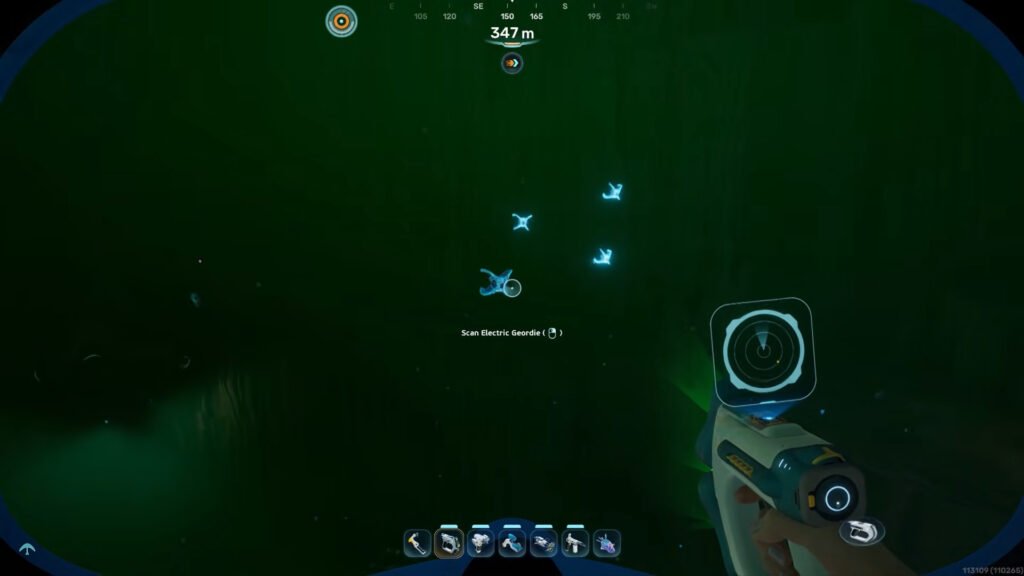
    Subnautica 2 Power Plant
    Image via Unknown Worlds Entertainment | @QuickTipshow/YouTube

    The Electric Geordie is primarily found in these biomes:

    • Observatory Island
    • Power Plant
    • Root Canyon

    We were able to spot it in the Power Plant area, 1700 meters east of the Lifepod. Head down to a depth of approximately 300-500m and look around the area to find Electric Geordie. These are glowing blue creatures, which can shock you. So, do not try to get too close.

    The other biomes will likely also contain the Geordie at a similar depth. However, they can wander quite a bit in this range, so be sure to check properly. Turning off your flashlight can help in this case since they do stand out quite a bit from their glow-in-the-dark traits.

    Read More: Subnautica 2: How To Find and Escape Collector Leviathan

    How To Scan the Electric Geordie in Subnautica 2
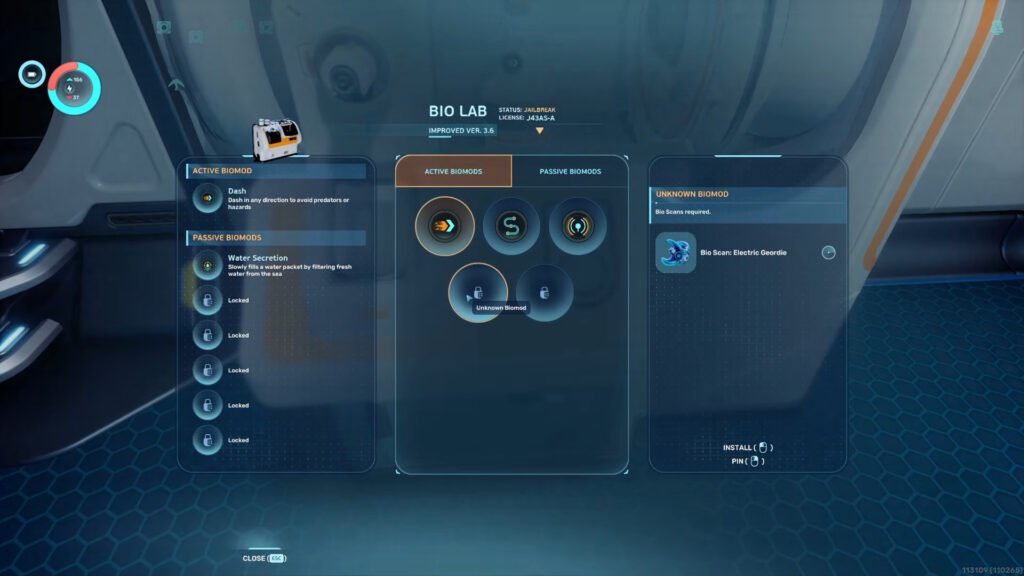
    Electric Geordie Biomod
    Image via Unknown Worlds Entertainment | @QuickTipshow/YouTube

    You can use the Bioscanner to take a quick scan of the creature from a decent range. However, if it does get hostile and tries to attack you, do not worry.

    Get inside the Tadpole. There are two reasons for this. Firstly, the ship will protect you from taking direct damage from the hostile creature. Secondly, the Geordie prioritizes attacking the Tadpole over you. Even staying in its vicinity should be enough to stop the Geordie from attacking you (most of the time).

    Note: Do keep in mind that the Geordie starts sapping the energy from the Tadpole very quickly. So, scan it and kill it as fast as possible.

    You can unlock two biomods from this scan:

    • Electric Discharge (Active): Emits a shock to deter threats
    • Bioluminescence (Passive): Glow in the dark
      • Note: You will also need to scan a Sandspear to unlock this mod.

    After the scan is done, you can collect the Geordie if you wish. However, be careful before consuming it, as it gives you +20 Food, but -10 Health as well.

    FAQs

    How to make the Electric Geordie flee in Subnautica 2?

    If it is attached to your Tadpole, then you can get rid of it by hitting it with the Survival Multitool once. Alternatively, if there are multiple of them, the Sonic Resonator gets the job done quickly.

    However, do check properly to make sure that all the parasites have been driven away. Even one of them on your ship can drain a significant amount of power over time.

    What is the Electric Geordie’s weakness?

    If this creature moves too fast for you to hit properly, and you just want to drive it away, light is your best friend. Shining a flashlight in its face drives it away quite effectively.

    How to equip biomods?

    You can equip new mods at the Biolab.

    Subnautica 2
    Pranshu Aryan
    • X (Twitter)
    • LinkedIn

    Pranshu Aryan is a dedicated content writer with over a year of experience under his belt in the gaming journalism industry. He started his gaming journey with games like Minecraft and some of the older LEGO titles. However, he now prefers to play singleplayer, story-driven games with a focus on RPG-mechanics. Currently some of his favorite games include The Witcher 3, Cyberpunk 2077, Kingdom Come Deliverance, among others. When he is not writing, Pranshu prefers to spend his time reading books, swimming, or catching up on his backlog of games.

    Related Posts

    Subnautica 2: How To Find and Scan Sandspear

    By Sohan DasguptaMay 20, 2026

    Subnautica 2: How To Unlock and Craft Scout Ray Chassis

    By Pranshu AryanMay 20, 2026

    Subnautica 2: How To Get Strontium

    By Sohan DasguptaMay 18, 2026

    Subnautica 2: How To Find and Scan Deepwing Brooder

    By Pranshu AryanMay 18, 2026
    Add A Comment

    Comments are closed.

    Don't Miss

    Cyclops Marvel Rivals Guide: Abilities, Team-Ups & Counters

    By Jordan BlakeJune 13, 2026

    Want to master Cyclops in Marvel Rivals? Here’s a complete Cyclops guide covering his abilities, best team-ups, counters, team comps, and gameplay tips.

    How to Create and Customize Roblox Avatar

    June 13, 2026

    How to Play Roblox on PC, Mobile and Console

    June 13, 2026

    How to Add Friends in Roblox on PC and Mobile

    June 12, 2026
    Our Picks

    Cyclops Marvel Rivals Guide: Abilities, Team-Ups & Counters

    By Jordan BlakeJune 13, 2026

    How to Create and Customize Roblox Avatar

    By Sagnik AdhikaryJune 13, 2026

    How to Play Roblox on PC, Mobile and Console

    By Sagnik AdhikaryJune 13, 2026

    How to Add Friends in Roblox on PC and Mobile

    By Sagnik AdhikaryJune 12, 2026
    • Home
    • Privacy Policy
    • Our Authors
    • Terms and Conditions
    • Editorial Guidelines
    • Cookie Policy
    • Contact Us
    • About Us
    © 2026 GameDevourer

    Type above and press Enter to search. Press Esc to cancel.