
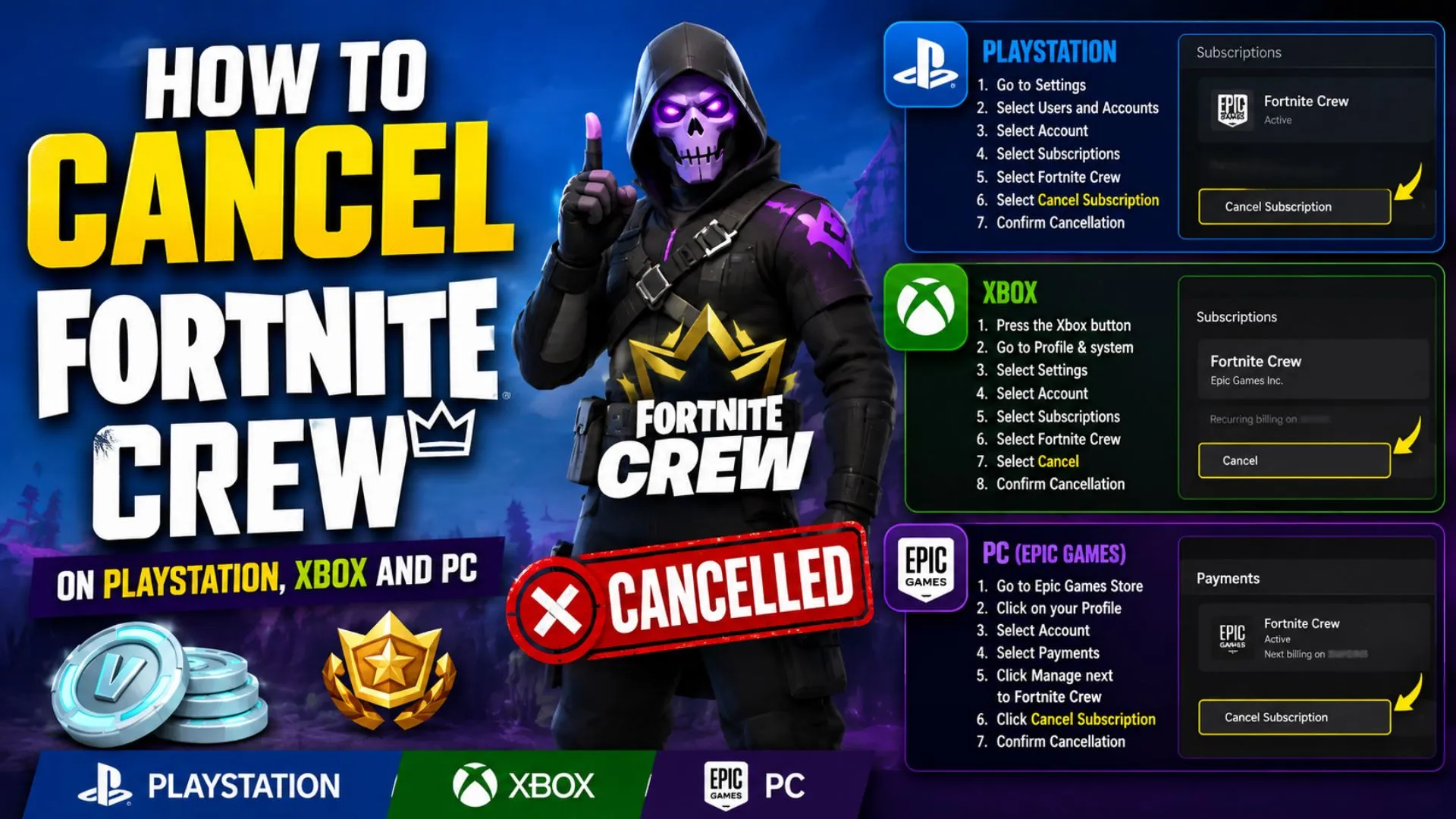
Fortnite Crew is by no means a bad subscription service since it offers genuine value for regular Fortnite players. However, after recent changes, such as the monthly V-Bucks grant being reduced from 1,000 to 800 while the price remains the same, some players may want to cancel the service and spend their money elsewhere.
Even with the current benefits, you may be better off cancelling your Crew subscription if you don’t play Fortnite regularly or don’t use all the included passes. In this guide, I’ll take you through the steps to cancel Fortnite Crew, how the billing cycle works, and what you get to keep after cancelling.
What is Fortnite Crew?

Fortnite Crew is an optional monthly subscription service that offers subscribers access to several Fortnite benefits.
These usually include the following:
- Crew Pack: Every month, you get a new Crew Pack with an active Fortnite Crew subscription. This usually includes an Outfit, its LEGO variant, and matching cosmetics such as a Pickaxe, Back Bling, Wrap, or other items. At the time of writing, the June 2026 Crew Pack includes the Corascana Outfit, Stormwings Back Bling, and Bolt Blade Pickaxe.
- Battle Pass: With an active Fortnite Crew subscription, you get full access to the current Battle Pass and its premium rewards.
- OG Pass: Similar to the regular Battle Pass, Fortnite Crew also includes access to the current OG Pass and its premium rewards while your subscription is active.
- LEGO Pass: The current LEGO Pass is also included in your Fortnite Crew subscription, allowing you to claim premium rewards while your subscription remains active.
- Music Pass: Fortnite Crew includes the Music Pass, which offers premium rewards that can be used in Fortnite Festival and other Fortnite experiences.
- 800 V-Bucks: You currently get 800 V-Bucks every month with an active Fortnite Crew subscription.
- Rocket Pass Premium: Rocket Pass Premium in Rocket League is included with your Crew subscription as long as you use the same Epic Games account in Fortnite and Rocket League.
Since Fortnite Crew benefits can change over time, it’s always worth checking the current Crew page before subscribing or cancelling.
Why You Might Want to Cancel Fortnite Crew
Since Fortnite Crew’s value has changed slightly over time, some players may want to cancel it.
Here are a few reasons why:
- Avoid Recurring Charges: Once you subscribe to Fortnite Crew, you will be charged every month as long as the subscription is active. If you don’t want to get billed automatically, cancelling auto-renewal is the safest option.
- Not Using All Benefits: Fortnite Crew offers several benefits, but not every player uses all of them. If you only care about the regular Battle Pass and don’t use the LEGO Pass, Music Pass, OG Pass, Rocket Pass Premium, or monthly Crew Pack, the subscription may not be worth it for you.
- Taking a Break From Fortnite: Sometimes you may want a change of pace after grinding Fortnite regularly. If you’re playing other games or subscribing to services like PlayStation Plus, Xbox Game Pass, or other gaming memberships, cancelling Fortnite Crew can help you avoid unnecessary monthly spending.
- Waiting for a Better Crew Pack: Some players subscribe only when they like the monthly Crew Pack. If the current outfit or cosmetics don’t interest you, you can cancel and rejoin later when a better pack arrives.
Things to Know Before Cancelling

Before you cancel your Fortnite Crew subscription, there are a few important things you should know.
- Claimed Rewards Stay: If you have already claimed your Crew Pack, V-Bucks, or premium rewards, they remain in your account after cancellation. For example, if you already claimed the current Crew Pack, you can keep it even after cancelling.
- Benefits Continue Until Billing Ends: Cancelling Fortnite Crew does not immediately remove your benefits. You keep access to your Crew benefits until the end of your current billing period.
- Billing Cycle: Fortnite Crew auto-renews based on the platform and date you originally subscribed. For example, if your billing date is August 15, your next renewal will usually happen around September 15, depending on the platform.
- No Automatic Refund After Cancelling: Cancelling Fortnite Crew stops future renewals. It does not automatically refund the current billing period. If you purchased through Epic Games, Fortnite Crew subscriptions are not refundable. If you subscribed through PlayStation, Xbox, Nintendo, Apple, or another platform, refund rules depend on that platform’s policy.
- Cancel From the Same Platform: You must cancel Fortnite Crew from the platform where you originally subscribed. If you subscribed on PlayStation, cancel it through PlayStation. If you subscribed through Epic on PC or mobile, cancel it through Epic.
Before making account or payment changes, make sure your Epic Games account is protected. You can enable 2FA in Fortnite to add an extra layer of security.
How to Cancel Fortnite Crew on Different Platforms
1. Cancel Fortnite Crew on PlayStation PS5
The steps to cancel Fortnite Crew on PS5 are simple:
- From your PS5 home screen, go to Settings.
- Select Users and Accounts.
- Go to Account.
- Select Payment and Subscriptions.
- Go to Game and App Services.
- Navigate to Fortnite.
- Find Fortnite Crew.
- Select Turn Off Auto-Renew.
Once done, your Fortnite Crew expiry date should be displayed.
2. Cancel Fortnite Crew on PlayStation PS4
If you are using a PS4, follow these steps:
- From your PS4 home screen, go to Settings.
- Select Account Management.
- Go to Account Information.
- Select Services List.
- Navigate to Fortnite.
- Find Fortnite Crew.
- Select Turn Off Auto-Renew.
This will stop Fortnite Crew from renewing after your current billing period ends.
Cancel Fortnite Crew on Xbox
Fortnite Crew cancellation on Xbox is usually managed through your Microsoft account. Here’s how to do it:
- Go to account.microsoft.com/account from a web browser.
- Sign in to the Microsoft account used for Fortnite Crew.
- Select Services & Subscriptions.
- Find your Fortnite Crew subscription.
- Select Manage.
- Click Turn Off Recurring Billing.
- Follow the on-screen instructions.
After this, your subscription will remain active until the end of the current billing period, but it should not renew again.
Cancel Fortnite Crew on PC or Mobile Through Epic Games
If you subscribed through Epic Games on PC or mobile, you can cancel Fortnite Crew in three ways.
I. Cancel In-Game
- Open Fortnite.
- Select the Passes tab.
- Select Manage Subscription.
- Select Cancellation Info.
- Select Cancel Subscription.
- Follow the on-screen instructions.
II. Cancel From the Epic Games Website
- Go to www.epicgames.com/account.
- Sign in to your Epic Games account.
- Select Subscriptions from the left menu.
- Click the Cog icon next to your subscription.
- Select Cancel Subscription.
- Follow the prompts shown on screen.
III. Cancel From the Epic Games Store App
- Open the Epic Games Store application.
- Click on your profile icon.
- Select Account.
- Go to the Subscription tab.
- Select Cancel.
How to Check if Fortnite Crew is Cancelled
You can check your Fortnite Crew status from inside Fortnite by following these steps:
- Open Fortnite.
- Click on the Passes tab at the top.
- Select Fortnite Crew.
- Click Manage Subscription.
- Click Cancellation Info.
- Check your cancellation status or next billing date.
You may also receive a confirmation email after cancelling, depending on the platform. If you don’t receive an email, don’t panic immediately. Instead, check your subscription page on the same platform where you originally subscribed.
Fortnite Crew Not Cancelling? Try These Fixes
Several players face problems while cancelling Fortnite Crew. If you’re one of them, try these quick fixes:
- Cancel From the Original Platform: You must cancel Fortnite Crew from the same platform where you originally purchased it. For example, if you subscribed through PlayStation, cancel it through PlayStation’s subscription settings, not only inside Fortnite.
- Check the Correct Account: Make sure you are signed in to the account that manages the Fortnite Crew billing. This is especially important if you play Fortnite on multiple platforms.
- Check for Multiple Subscriptions: If you see a message that you are subscribed on multiple platforms, cancel the extra subscription from the platform where it was purchased.
- Check Your Bank or Platform Billing Page: If you are unsure where you subscribed, check your bank statement, PlayStation subscriptions, Microsoft subscriptions, Epic Games subscriptions, or other platform billing pages.
- Contact Support: If the subscription still appears active after cancellation, contact the support team for the platform where you subscribed. If you subscribed through Epic Games, contact Epic Games Support.
If you recently bought an item by mistake, cancelling Fortnite Crew will not refund that purchase. For that, you need to refund items in Fortnite through the item return option.
What Happens After Cancelling Fortnite Crew
Cancelling Fortnite Crew does not instantly remove everything from your account. Here’s what you can expect:
- Access Until Billing Ends: After you cancel, you can continue using your active Fortnite Crew benefits until the end of your current billing period.
- Claimed Rewards Stay: Crew Pack cosmetics, claimed V-Bucks, and rewards you already unlocked stay in your account.
- Pass Access Ends After Billing Period: When the subscription period ends, you lose full access to included passes like the Battle Pass, OG Pass, LEGO Pass, and Music Pass unless you buy them separately.
- No Future Charges: Since auto-renewal is turned off, you should not be charged again after the current billing cycle ends.
- You Can Rejoin Later: Cancelling Fortnite Crew is not permanent. You can subscribe again later if you like a future Crew Pack or want access to the included passes again.
If you are cancelling Crew to save money, you can still unlock some cosmetics through official events, promotions, and rewards. Check these ways to get free skins in Fortnite legally.
Will I lose my Fortnite Crew skins after cancelling?
No, you will not lose Fortnite Crew skins or cosmetics that you already claimed. Claimed Crew Pack rewards stay in your account.
Will I lose my V-Bucks after cancelling Fortnite Crew?
No, any V-Bucks already granted to your account will remain there after cancellation.
Can I get a refund after cancelling Fortnite Crew?
Cancelling Fortnite Crew does not automatically give you a refund. Epic-purchased Fortnite Crew subscriptions are not refundable. If you subscribed through PlayStation, Xbox, Nintendo, Apple, or another platform, refund decisions depend on that platform’s policy.
Can I rejoin Fortnite Crew later?
Yes, you can rejoin Fortnite Crew anytime after cancelling your active subscription.
Why am I still being charged after cancelling Fortnite Crew?
You may still be charged if you cancelled after the renewal date, cancelled on the wrong platform, used the wrong account, or have more than one active Fortnite Crew subscription across platforms.
How do I check my next Fortnite Crew billing date?
Open Fortnite, go to the Passes tab, select Fortnite Crew, click Manage Subscription, then choose Cancellation Info to view your next billing date.
Do I need to cancel Fortnite Crew from Epic or my console?
You need to cancel it from the platform where you originally subscribed. If you bought it on PlayStation, cancel through PlayStation. If you bought it through Epic, cancel through your Epic Games account.
