
There comes a point where your Roblox username just does not fit anymore. Maybe you picked it in a hurry when you first signed up, or it was funny at the time and now it just feels embarrassing. Whatever the reason, Roblox gives you two ways to change your name and they work very differently from each other.
Before you spend 1,000 Robux on a username change, it is worth knowing exactly what you are paying for, what stays the same, and whether a free display name change would actually solve your problem. Here is everything you need to know How to Change Your Roblox Username.
Username vs Display Name: What Is the Difference?
This is where most players get confused, and it is an important distinction before you spend anything.
- Your username is your account’s permanent identifier. It is unique – No two players can share one. It is tied to your login, your profile URL, and how other players search for you on the platform. Every time you change it, Roblox charges 1,000 Robux.
- Your display name is what appears above your avatar in most Roblox experiences and on your profile. Display names do not have to be unique, so multiple players can use the same one. Changing it is completely free, with no Robux required, and you can do it once every 7 days.
| Username | Display Name | |
|---|---|---|
| Unique to your account | Yes | No |
| Cost to change | 1,000 Robux | Free |
| How often | Anytime (costs Robux each time) | Once every 7 days |
| Affects profile URL | Yes | No |
| Affects login | Yes | No |
| History visible to others | Yes | No |
Your username might be Wolverine1526 and your display name might be Wolverine. If you want to change Wolverine1526 to something different, that costs 1,000 Robux. If you just want to change the name floating above your avatar from Wolverine to Logan, that is completely free.
If you only want a different name to appear in games, changing your display name is almost always the right move.
How to Change Your Roblox Username on PC
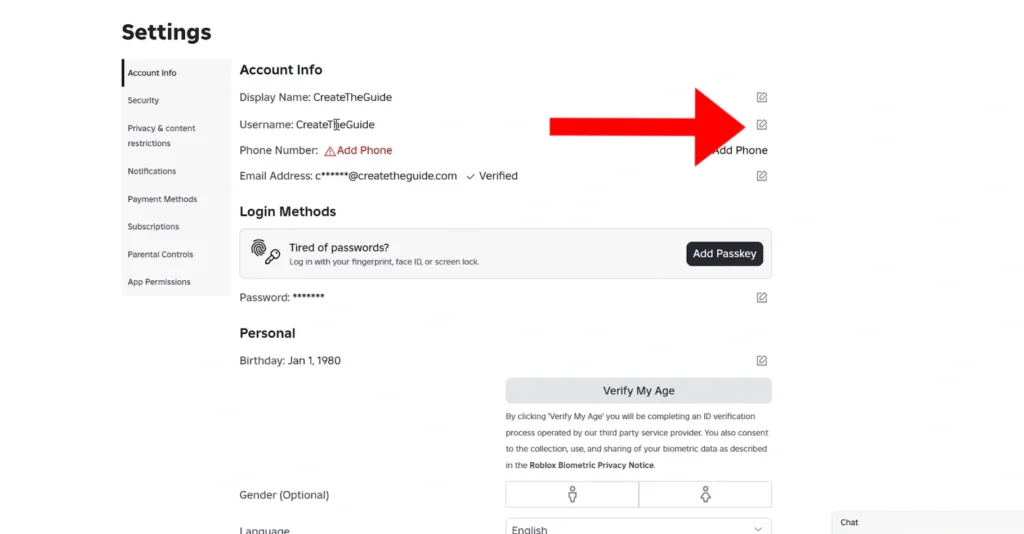
Before you start, make sure your account is verified with an email address or phone number. Roblox requires this for security before the username change option becomes accessible. Also confirm you have at least 1,000 Robux in your account the transaction cannot be reversed once confirmed.
- Open your preferred web browser and sign in to your Roblox account.
- Click the Gear icon in the upper-right corner of the screen.
- Select Settings from the drop-down menu.
- Under the Account Info tab, click the Pencil (Edit) icon next to your current username.
- Enter the username you’d like to use. The platform will automatically check whether it’s available and whether it meets the platform’s naming rules.
- Type your current account password.
- Click Buy to confirm the username change. The transaction will deduct 1,000 Robux from your account.
Your new username is active right away. The old one is saved to your account history so no one else can take it but you will need to pay 1,000 Robux again if you ever want to switch back.
Console players: There is no built-in method to change your username on PlayStation or Xbox. Use a PC or mobile device instead.
How to Change Your Roblox Username on Mobile (Android and iOS)
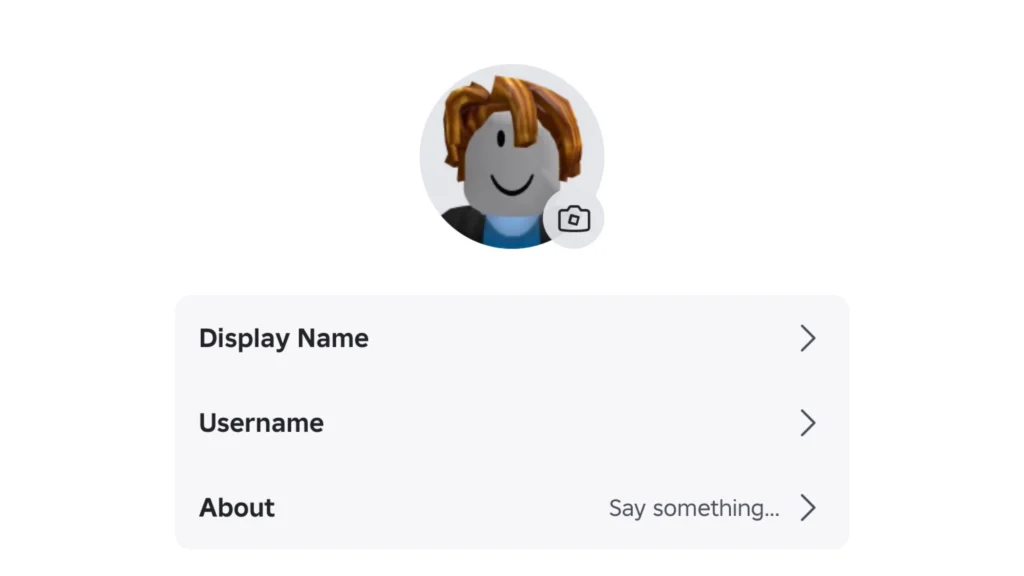
The process on mobile is nearly identical to PC. You still need 1,000 Robux and a verified account before you can make the change.
- Open the Roblox app and sign in to your account if you haven’t already.
- Tap More (the three-dot icon) in the top-left corner of the screen.
- Click on your profile at the top of the screen.
- Tap Edit Profile.
- Select Username.
- Enter the new username you’d like to use. Roblox will check whether it’s available and complies with its username requirements.
- Enter your account password to verify the request.
- Tap Buy to confirm the change and spend 1,000 Robux.
The change takes effect immediately after the transaction is processed. Everything else on your account — friends, avatar items, badges, game progress, Robux balance stays exactly as it was.
How to Change Your Roblox Display Name
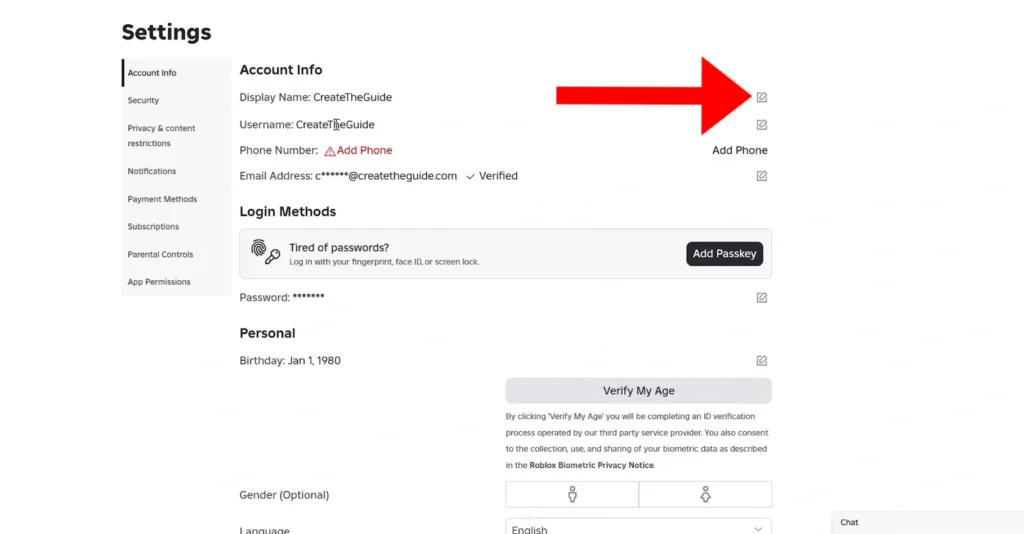
Changing your Roblox display name is completely free, with one minor catch: You can change it once every 7 days. Technically, this isn’t a catch, since you can change it for free again after a week. So, here’s how to do it:
On browser:
- Sign in to your Roblox account.
- Click the Gear icon in the upper-right corner.
- Select Settings.
- Go to the Account Info tab
- Click the Pencil icon next to your current display name.
- Type your new display name.
- Click Save
On the Roblox app:
- Tap More (three-dot icon) in the bottom-right corner
- Tap Settings
- Go to Account Info
- Tap the Pencil icon next to your display name
- Enter the new name and tap Save
Once saved, both your display name and username will be visible on your profile and in Roblox experiences. Since display names are not unique, do not be surprised if another player is already using the same one.
Username Rules and Restrictions
Roblox reviews every username against its moderation system before approving the change. Spending 1,000 Robux on a name that gets rejected is frustrating, check these rules first.
Key restrictions to know:
- Your new username must be available. Roblox will not let you use one already taken by another account.
- Usernames cannot be transferred between accounts, even if you own both.
- All usernames are filtered against Roblox Community Standards. Inappropriate language, impersonation of others, or use of official brand names will be rejected.
- Minor edits like capitalisation changes still count as a full change and cost 1,000 Robux.
- Your account creation date, friends list, inventory, badges, game progress, and Robux balance remain unchanged.
- Previous usernames are visible to other players through People Search, your profile, and your account settings.
- Roblox saves your old username to your account after every change, so no one else can claim it immediately.
Display Name Rules and Restrictions
Display names are free and flexible, but Roblox still applies moderation rules before a new name can be saved.
- Display names must follow Roblox’s Community Standards. Profanity, hate speech, and harassment are not permitted.
- Names are filtered automatically. Even a name that seems harmless might be rejected if it triggers Roblox’s safety checks.
- Display names do not have to be unique across the platform.
- Changing your display name does not affect your username, login, or profile URL in any way.
- If your display name is rejected, you will not be charged anything.
What Happens After You Change Your Username?
What changes:
- Your username is updated everywhere on Roblox
- Your profile URL updates to reflect the new username
- The next time you sign in with a username, you will need to use the new one
What stays the same:
- Your display name (unless you change it separately).
- Your friends list, avatar, inventory, badges, game progress, and remaining Robux.
- Your previous usernames saved to your account history, visible on your profile and in People Search.
- Sign-in via verified email address, phone number, or other linked login methods – These continue to work as before.
If you later want to go back to an old username, you can but you will need to go through the same process and pay 1,000 Robux again, provided that name is still available. Your display name, friends list, avatar, inventory, badges, game progress, and remaining Robux all stay the same. If you want to pair your new username with a fresh look, here is how to customize your Roblox avatar.
Common Errors and How to Fix Them
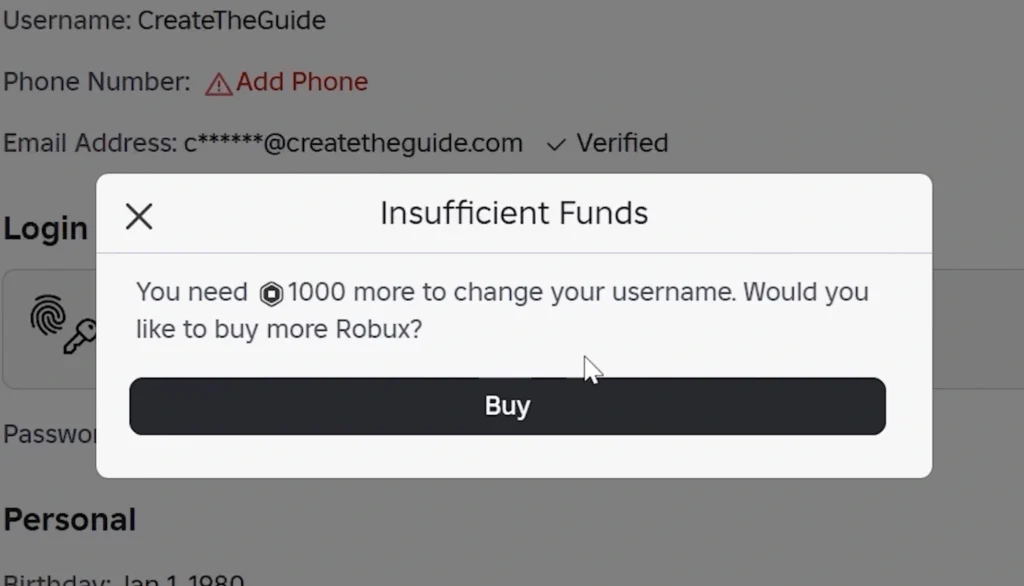
If your username change is not going through, one of these is usually the reason:
- Username already taken: Every Roblox username must be unique. Try a variation of your preferred name.
- Does not meet Community Standards: Your chosen name contains something flagged by Roblox’s moderation filters. The 1,000 Robux fee will not be deducted in this case — choose a different name and try again.
- Not enough Robux: The change requires exactly 1,000 Robux in your account balance. Check our guide on how to get free Robux in Roblox before attempting the change.
- Wrong password entered: Roblox requires your current password as a security check before any username change. If you have forgotten it, reset your password first before attempting the change.
- Account not verified: If the username change option is not appearing in your settings, your account may not have a verified email address or phone number attached. Add and verify one under Account Info before trying again.
- Temporary platform issues: If everything looks correct but the change still will not go through, check the Roblox Status page to confirm whether there is an ongoing outage. Wait and try again once the platform is stable.
A username change is a permanent identity shift that costs Robux every time. If all you want is a different name floating above your avatar in games, the free display name change will do exactly that without touching your Robux balance. Save the 1,000 Robux for the times you genuinely need a new account identity and when you do spend it, make sure it is a name you will actually stick with.
How much does it cost to change a Roblox username?
Roblox charges 1,000 Robux every time you change your username including if you switch back to a previous one. Even a small change like capitalisation counts as a full username change and costs the same.
Can I change my Roblox username for free?
No. Username changes always cost 1,000 Robux. If you only want a different name to appear in games, changing your display name is free and available once every 7 days.
Is changing a Roblox display name free?
Yes. Display name changes are completely free and do not require Robux. You can change it once every 7 days as long as your new name follows Roblox’s Community Standards.
Will I lose my friends or game progress after changing my username?
No. Your friends list, avatar, inventory, badges, purchases, and game progress all remain tied to your account. A username change only changes the name — nothing else on your account is affected.
Can I use someone else’s Roblox username?
No. Every Roblox username is unique. If another account is using it, you cannot claim it. Roblox also saves your old username to your account after every change, meaning no one else can take it immediately either.
Can other players see my previous Roblox usernames?
Yes. Roblox keeps a full history of your previous usernames, visible on your profile, through People Search, and in your own account settings.
Why is Roblox rejecting my new username?
The most common reasons are that the username is already in use or it violates Roblox’s Community Standards. If rejected for moderation reasons, your 1,000 Robux will not be charged.
Can I change my Roblox username on mobile?
Yes. Open the Roblox app, go to More > Profile > Edit Profile > Username. The same 1,000 Robux fee applies, and your account must be verified before the option appears.
