

Close Menu
    What's Hot

    How to Fix Roblox Not Working

    June 10, 2026

    How To Cancel Fortnite Crew on PlayStation, Xbox and PC

    June 9, 2026

    How to Join Private Servers in Roblox

    June 9, 2026
    Facebook X (Twitter) Instagram
    Game Devourer
    • Home
    • News
    • Guides
    Game Devourer
    You are at:Home - Guides - Windrose: How To Change Time Of Day
    Guides

    Windrose: How To Change Time Of Day

    By Pranshu AryanApril 18, 20263 Mins Read
    Facebook Twitter Pinterest Reddit WhatsApp Copy Link
    Windrose Change Time of Day
    Image via Kraken Express

    Summary

    • You can change the time of day in Windrose by sleeping.
    • However, this only works at night, so you cannot skip time during the day.
    • You will need to craft a bed to fall asleep.

    The night can be a dangerous place in Windrose, especially since your visibility can get quite limited. If you want to skip the night or change the time of the day, you are in luck, as there exists a simple technique that is also applicable in real life. This is the tried and tested method of falling asleep.

    How To Change the Time of Day in Windrose
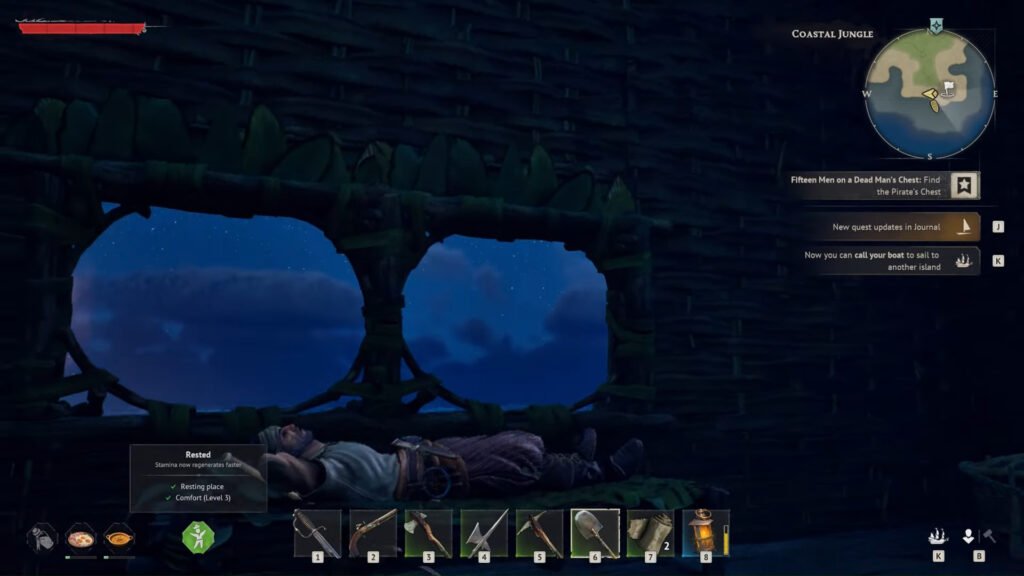
    Windrose sleep
    Image via Kraken Express | @QuickTipshow/YouTube

    There are many reasons to change the time in-game. It is harder to see and react to enemies at night, so you should try to sleep through the night.

    However, you will need a bed to actually proceed with this step. Once you have one, place it down and interact with it. This will start speeding up the time of day.

    You can stop sleeping whenever you want, and the acceleration of time will stop. This can even be done during the day. However, if you decide to place your bed anywhere randomly, it might not work.

    How Does a Bed Work in Windrose
    Windrose bed
    Image via Kraken Express | @QuickTipshow/YouTube

    If you have already crafted a bed but are unable to use it, its positioning might be wrong. Try to place it underneath a roof. Placing a bed in the open is not a good idea, and neither does it sound right.

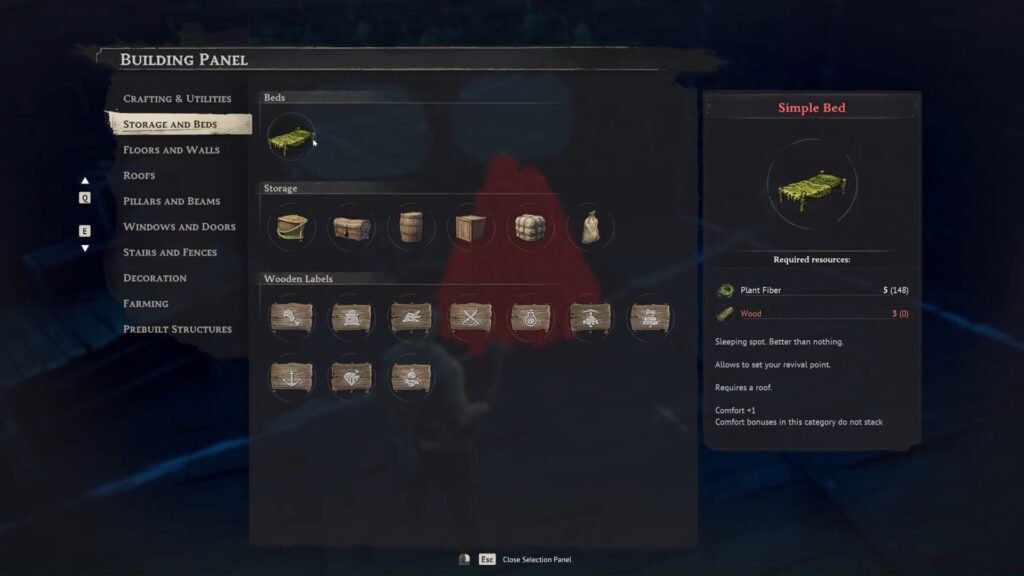
    You can craft a Simple Bed quite easily early on in the game. This item is found in the Storage and Beds section of the Building Panel.

    The items needed to make a bed are:

    • 5x Plant Fiber
    • 3x Wood

    FAQs

    Why would you want to skip time to night in Windrose?

    Supply drops are easier to spot at night due to the beacons of light being more visible against the night sky. Other than that, some enemies may only spawn at night, so advancing time is an easy way to get them to appear.

    Can you set your revival point at your bed?

    Yes, if you have slept in a bed, that will act as your revival point. So, if you die, you can respawn at the latest bed you used.

    Why can’t you sleep in your bed?

    If the bed is not working, the most likely reason is that the roof is not covering the bed. Try to place it inside your house, where a proper roof is available.

    Windrose
    Pranshu Aryan
    • X (Twitter)
    • LinkedIn

    Pranshu Aryan is a dedicated content writer with over a year of experience under his belt in the gaming journalism industry. He started his gaming journey with games like Minecraft and some of the older LEGO titles. However, he now prefers to play singleplayer, story-driven games with a focus on RPG-mechanics. Currently some of his favorite games include The Witcher 3, Cyberpunk 2077, Kingdom Come Deliverance, among others. When he is not writing, Pranshu prefers to spend his time reading books, swimming, or catching up on his backlog of games.

    Related Posts

    How to Play Split-Screen in Fortnite on PS4, PS5 and Xbox

    By Sagnik AdhikaryJune 8, 2026

    Everything is Crab: 5 Best Genetics

    By Pranshu AryanMay 11, 2026

    REPO Roll Staff Guide

    By Pranshu AryanMay 10, 2026

    How Many People Can Play REPO?

    By Sohan DasguptaMay 9, 2026
    Add A Comment

    Comments are closed.

    Don't Miss

    How to Fix Roblox Not Working

    By Sagnik AdhikaryJune 10, 2026

    Is Roblox not working on your device? Here are the best fixes for Roblox crashing, freezing, login errors, server issues, and launch problems on PC, mobile, PlayStation, and Xbox.

    How To Cancel Fortnite Crew on PlayStation, Xbox and PC

    June 9, 2026

    How to Join Private Servers in Roblox

    June 9, 2026

    How to Play Split-Screen in Fortnite on PS4, PS5 and Xbox

    June 8, 2026
    Our Picks

    How to Fix Roblox Not Working

    By Sagnik AdhikaryJune 10, 2026

    How To Cancel Fortnite Crew on PlayStation, Xbox and PC

    By Sagnik AdhikaryJune 9, 2026

    How to Join Private Servers in Roblox

    By Sagnik AdhikaryJune 9, 2026

    How to Play Split-Screen in Fortnite on PS4, PS5 and Xbox

    By Sagnik AdhikaryJune 8, 2026
    • Home
    • Privacy Policy
    • Our Authors
    • Terms and Conditions
    • Editorial Guidelines
    • Cookie Policy
    • Contact Us
    • About Us
    © 2026 GameDevourer

    Type above and press Enter to search. Press Esc to cancel.