

Skate players have been running into a frustrating problem during Early Access. The map stops showing important markers and highlighted areas needed to complete story missions. This leaves players stuck and unable to make progress in the game.
The bug affects many different objectives throughout the game. You may find yourself free roaming with no clear direction on where to go next. The map appears empty when it should be showing challenge locations and quest markers.
Ways to Fix Skate Map Highlight Bug
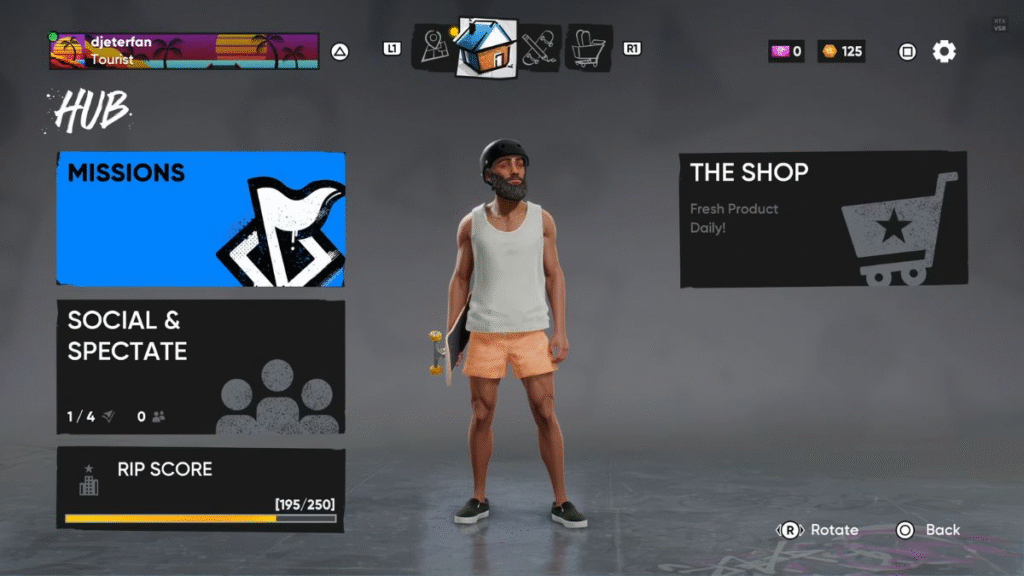
The fastest way to fix the map highlight bug in Skate is to use the Social and Spectate feature to teleport to another player. This resets your map and brings back all the missing icons and highlighted areas you need to continue playing.
Many players have tried restarting their game completely. While this can work, it means waiting in long queues to get back into the game. The teleport method is much faster and gets you back to playing right away.
What Causes the Map Bug in Skate
The map highlight bug happens when the game fails to load objective markers properly. Players will get missions that tell them to complete challenges in highlighted areas, but those areas never appear on the map. The map looks completely empty with no icons or markers visible.
This problem can happen at any point during story progression. Some players encounter it early in the game, while others run into it later. If you’re new to Skate’s Early Access, this bug might be one of the first technical issues you face. The bug seems to affect different types of objectives, not just one specific mission type.
Step by Step Fix for Skate Map Issues
To fix your broken map, first open your game settings menu. Look for the Hub option and select it. Inside the Hub menu, you will find a feature called Social and Spectate.
The Social and Spectate feature lets you see other players in your current lobby. You can choose any player from the list and teleport directly to their location. When you teleport to another player, the game resets your map data.
After teleporting, check your map again. All the missing icons and highlighted areas should now be visible. You can continue with your story missions and complete the objectives that were previously impossible to find.
Alternative Solutions for Skate Map Problems
If the teleport method does not work for you, try restarting the entire game. Close the game completely and launch it again. This forces the game to reload all map data from scratch.
Some players have found success by switching between different game modes. Try going into a challenge or different area, then return to the main world. This can sometimes refresh the map display. Unlike the differences between Skate and Tony Hawk’s Pro Skater, this technical issue affects the core gameplay experience regardless of your skating style preference.
Make sure your game is updated to the latest version. EA has been releasing patches to fix various bugs, including map related issues. Check for updates in your game launcher before trying other solutions.
How to Prevent Future Map Bugs in Skate

While you cannot completely prevent this bug from happening again, you can minimize the chances. Avoid rapidly switching between different areas of the game. Give the map time to load properly when entering new zones.
Keep the Social and Spectate fix in mind for quick solutions. Since this method works reliably, you can use it whenever the map bug appears again. The fix only takes a few seconds to complete.
The development team continues working on permanent solutions for these map issues. Future updates should reduce how often players encounter this problem during normal gameplay. For more information about what to expect from Skate 4, check out the complete feature breakdown and upcoming content plans.
This simple teleport trick has helped many players continue their progress when the map stops working properly. The bug can be frustrating, but knowing this quick fix means you can get back to enjoying Skate without long delays.
